> ## Documentation Index
> Fetch the complete documentation index at: https://help.lobyco.com/llms.txt
> Use this file to discover all available pages before exploring further.
# Bonus Integration
> Integrating Lobyco bonus.
Learn how to integrate with Lobyco's Bonus system for loyalty points management.
## Overview
Lobyco's Bonus (or currency master) system provides comprehensive loyalty currency management, handling everything from balance tracking to complex earn/burn scenarios. This guide explains the standard setup and integration options for vendors working with the Currency Master system.
## Standard Bonus Setup
When Lobyco serves as the currency master, the platform provides a complete currency ledger solution with the following capabilities:
### Key Features
* **Configurable Earn/Burn Rules**: Set up flexible earning and burning rules by banner and/or partner
* **Spend Optimization**: Maximize customer spending through currency multipliers and promotional events
* **Flexible Expiry Management**: Configure customizable expiry parameters for currency balances
* **Multi-Channel Redemption**: Enable flexible redemption across all channels
* **Product Controls**: Define product/category inclusions and exclusions for currency calculations
* **Advanced Timing**: Implement tailored timing mechanisms for customer earn calculations (e.g., time of day restrictions)
* **Third-Party Integration**: Support for external earn integrations
## Integration Options
Some existing loyalty programs may require bonus integration beyond the standard setup. There are two primary integration scenarios:
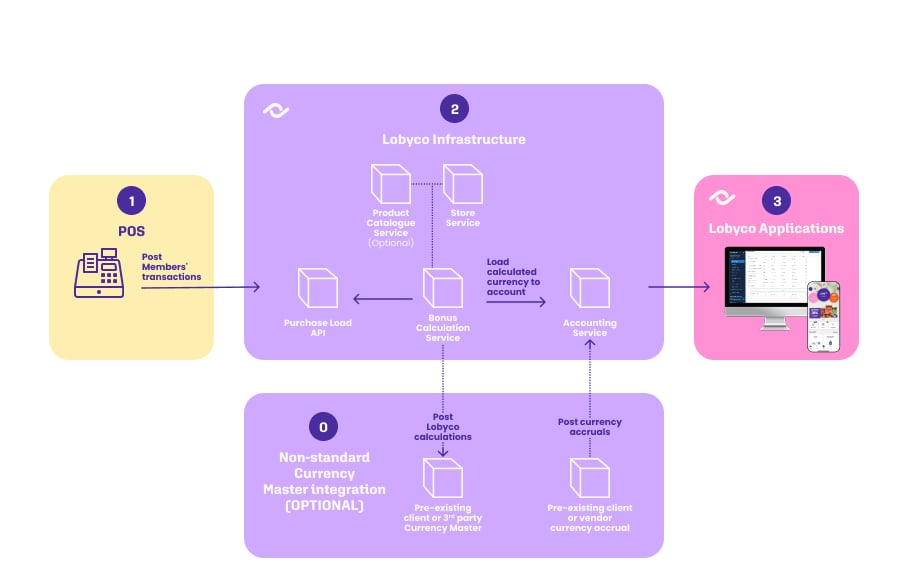
### Option 1: Posting to External Bonus System
In this scenario, Lobyco calculates bonus amounts and posts them to a client or third-party Bonus system.
**Requirements**: A direct integration agreement between Lobyco and the external Bonus system must be established.
### Option 2: External Posting to Lobyco
For vendors or clients who need to post currency calculations or accruals to customer balances in Lobyco's system.
## API Integration
### Bonus API Endpoint
External vendors and clients can integrate currency earnings using the **Lobyco bonus API /load** endpoint:
```json theme={"system"}
{
"amount": 0,
"operationId": "string",
"transactionType": "string",
"storeId": "string",
"receiptId": "string"
}
```
### Required Parameters
When integrating with this endpoint, ensure the following requirements are met:
#### transactionType
The name of a pre-existing bonus type configured in Lobyco's Bonus system.
**Example**: `"YearlyMemberDividends"`
#### storeId
Must match the store IDs already defined in your store integration or manual import from your [Retail Master Data integration](/integration/other-integrations/retail-master-data).
**Important**: Store ID consistency is crucial for proper integration functionality.
#### receiptId
Must follow the same logic used to define your globally unique receipt ID, as established in your [Retail Master Data integration](/integration/other-integrations/retail-master-data) for Purchase Data.
**Important**: Receipt ID consistency ensures proper transaction tracking and prevents duplicates.
## System Architecture
The following diagram illustrates the Bonus flow and how integrations affect Lobyco services.
 ## Next Steps
### Review your existing loyalty program structure
### Determine which integration option best fits your needs
### Ensure your [Retail Master Data integration](/integration/other-integrations/retail-master-data) is properly configured
### Test the integration with sample transactions
### Implement proper error handling and monitoring
For additional support or questions about Bonus integration, contact the Lobyco technical team.
## Next Steps
### Review your existing loyalty program structure
### Determine which integration option best fits your needs
### Ensure your [Retail Master Data integration](/integration/other-integrations/retail-master-data) is properly configured
### Test the integration with sample transactions
### Implement proper error handling and monitoring
For additional support or questions about Bonus integration, contact the Lobyco technical team.