> ## Documentation Index
> Fetch the complete documentation index at: https://help.lobyco.com/llms.txt
> Use this file to discover all available pages before exploring further.
# POS (Point of Sale) Integrations
> Connect a POS or e-commerce checkout to Lobyco across the whole purchase lifecycle.
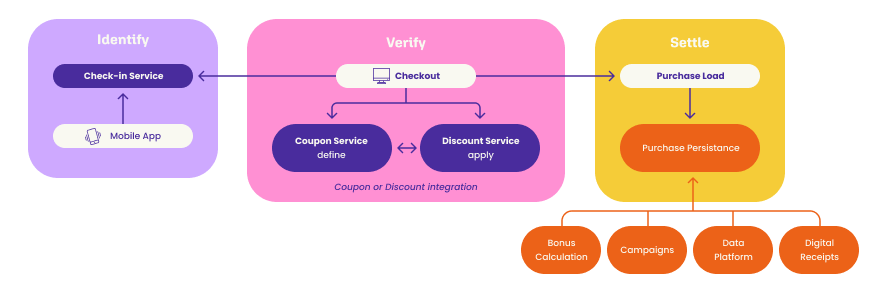
This section describes how a Point of Sale (POS) or e-commerce checkout integrates with Lobyco across the **whole purchase lifecycle** — from checking a customer in, through applying discounts and taking payment, to recording the finalized transaction. Each step is handled by a different Lobyco service, and each service has a distinct job. Use this page to understand which API does what before diving into the detailed guides.
Only the **Purchase API** records the sale. Calculating discounts and capturing payment do not — if you skip [Transaction Data](/integration/pos-point-of-sale-integrations/transaction-data), customers get no bonus, no receipts and no challenge progress.
## The purchase lifecycle
A typical customer purchase flows through the following stages. Not every integration uses every stage (for example, payment through Lobyco is optional), but the order and the responsibility of each API stay the same.
 ## Set up payment locations *(one-time)*
Register each POS or self-checkout as a payment location so it can accept check-in and payments.
[Setting up a payment location](/integration/pos-point-of-sale-integrations/setting-up-a-payment-location)
## Check the customer in
The customer is identified at the payment location, either by scanning a QR-code sticker at the POS or by the POS scanning a code from the app.
[Registering at POS](/integration/pos-point-of-sale-integrations/registering-at-pos)
## Calculate discounts
Apply the customer's coupons and offers to the basket. You choose one of two approaches: the POS decides what to apply (Coupon API) or Lobyco decides (Discount API).
**This step only calculates prices — nothing is stored or charged yet.**
[Direct Coupon Service Integration](/integration/pos-point-of-sale-integrations/direct-coupon-service-integration) / [Discount Integration](/integration/pos-point-of-sale-integrations/discount-integration)
## Take payment
Capture funds through the Payment Coordinator (bonus, card, Apple / Google Pay, loyalty subscription).
[Payments](/integration/pos-point-of-sale-integrations/payments)
## Redeem coupons
Confirm which coupons were actually used so they can't be reused, or include them on the purchase for offline redemption.
[Coupon Redemption at POS](/integration/pos-point-of-sale-integrations/coupon-redemption-at-pos)
## Record the transaction
Send the finalized sale to the **Purchase API**. This stores the receipt and publishes it so customers receive digital receipts, real-time bonus, and challenge progress, and so the data feeds analytics.
[Transaction Data](/integration/pos-point-of-sale-integrations/transaction-data)
## Integration building blocks
The table below summarizes each building block and — importantly — which one actually **records the sale** and triggers customer benefits. Only the Purchase API does this.
| Building block | What it does | Records the sale? | Triggers bonus, receipts & challenges? | Guide |
| ------------------------------------------------------------------------------------------------------------------------------ | ------------------------------------------------------------------------ | ----------------- | -------------------------------------- | ------------------------------------------------------------------------------------------------------------------ |
| **Purchase API** — [POST /v1/purchases](/api-reference/retail-master-data/purchases/post-v1-purchases) | Stores the finalized transaction and publishes it to downstream services | ✅ Yes | ✅ Yes | [Transaction Data](/integration/pos-point-of-sale-integrations/transaction-data) |
| **Discount API** — [POST /v1/discounted-purchases](/api-reference/promotion-platform/discounts/post-v1-discounted-purchases) | Calculates discounts and applicable coupons for a basket during checkout | ❌ No | ❌ No | [Discount Integration](/integration/pos-point-of-sale-integrations/discount-integration) |
| **Coupon API** — […/coupons/…](/api-reference/promotion-platform/coupons-pos/get-v2-customers-customerid-coupons) | Lets the POS retrieve, reserve and redeem specific customer coupons | ❌ No | ❌ No (redemption only) | [Direct Coupon Service Integration](/integration/pos-point-of-sale-integrations/direct-coupon-service-integration) |
| **Payment Coordinator** — [POST /v2/payments](/api-reference/payments/payment-coordinator/post-v2-payments) | Authorizes, captures, refunds or cancels payment | ❌ No | ❌ No | [Payments](/integration/pos-point-of-sale-integrations/payments) |
| **Check-in** — [POST /v2/checkin/paymentlocation](/api-reference/payments/payment-coordinator/post-v2-checkin-paymentlocation) | Identifies the customer at the payment location | ❌ No | ❌ No | [Registering at POS](/integration/pos-point-of-sale-integrations/registering-at-pos) |
## Applying discounts: two options
Step 3 above can be implemented in one of two ways. Both end with the same coupon redemption step, and both still require you to record the finalized sale via the Purchase API.
| Approach | Who decides what to apply | Best when |
| ----------------------------------------------------------------------------------------------------------------------------------- | ------------------------- | ----------------------------------------------------------------------------------------------------- |
| [Direct Coupon Service Integration](/integration/pos-point-of-sale-integrations/direct-coupon-service-integration) **(Coupon API)** | The POS | The POS already holds the offer and discount definitions and wants full control over what is applied. |
| [Discount Integration](/integration/pos-point-of-sale-integrations/discount-integration) **(Discount API)** | Lobyco | You want Lobyco to own the discount logic, evaluate the products and return the calculated discounts. |
## Guides
Register each POS or self-checkout. Prerequisite for check-in and payments.
Both check-in directions — sticker scan and app scan.
The POS retrieves the customer's coupons and decides what to apply.
Send the basket to Lobyco and let Lobyco calculate the discounts.
Confirm which coupons were actually used so they cannot be reused.
Capture funds through the Payment Coordinator.
Send the finalized sale to the Purchase API. This is what records it.
## Set up payment locations *(one-time)*
Register each POS or self-checkout as a payment location so it can accept check-in and payments.
[Setting up a payment location](/integration/pos-point-of-sale-integrations/setting-up-a-payment-location)
## Check the customer in
The customer is identified at the payment location, either by scanning a QR-code sticker at the POS or by the POS scanning a code from the app.
[Registering at POS](/integration/pos-point-of-sale-integrations/registering-at-pos)
## Calculate discounts
Apply the customer's coupons and offers to the basket. You choose one of two approaches: the POS decides what to apply (Coupon API) or Lobyco decides (Discount API).
**This step only calculates prices — nothing is stored or charged yet.**
[Direct Coupon Service Integration](/integration/pos-point-of-sale-integrations/direct-coupon-service-integration) / [Discount Integration](/integration/pos-point-of-sale-integrations/discount-integration)
## Take payment
Capture funds through the Payment Coordinator (bonus, card, Apple / Google Pay, loyalty subscription).
[Payments](/integration/pos-point-of-sale-integrations/payments)
## Redeem coupons
Confirm which coupons were actually used so they can't be reused, or include them on the purchase for offline redemption.
[Coupon Redemption at POS](/integration/pos-point-of-sale-integrations/coupon-redemption-at-pos)
## Record the transaction
Send the finalized sale to the **Purchase API**. This stores the receipt and publishes it so customers receive digital receipts, real-time bonus, and challenge progress, and so the data feeds analytics.
[Transaction Data](/integration/pos-point-of-sale-integrations/transaction-data)
## Integration building blocks
The table below summarizes each building block and — importantly — which one actually **records the sale** and triggers customer benefits. Only the Purchase API does this.
| Building block | What it does | Records the sale? | Triggers bonus, receipts & challenges? | Guide |
| ------------------------------------------------------------------------------------------------------------------------------ | ------------------------------------------------------------------------ | ----------------- | -------------------------------------- | ------------------------------------------------------------------------------------------------------------------ |
| **Purchase API** — [POST /v1/purchases](/api-reference/retail-master-data/purchases/post-v1-purchases) | Stores the finalized transaction and publishes it to downstream services | ✅ Yes | ✅ Yes | [Transaction Data](/integration/pos-point-of-sale-integrations/transaction-data) |
| **Discount API** — [POST /v1/discounted-purchases](/api-reference/promotion-platform/discounts/post-v1-discounted-purchases) | Calculates discounts and applicable coupons for a basket during checkout | ❌ No | ❌ No | [Discount Integration](/integration/pos-point-of-sale-integrations/discount-integration) |
| **Coupon API** — […/coupons/…](/api-reference/promotion-platform/coupons-pos/get-v2-customers-customerid-coupons) | Lets the POS retrieve, reserve and redeem specific customer coupons | ❌ No | ❌ No (redemption only) | [Direct Coupon Service Integration](/integration/pos-point-of-sale-integrations/direct-coupon-service-integration) |
| **Payment Coordinator** — [POST /v2/payments](/api-reference/payments/payment-coordinator/post-v2-payments) | Authorizes, captures, refunds or cancels payment | ❌ No | ❌ No | [Payments](/integration/pos-point-of-sale-integrations/payments) |
| **Check-in** — [POST /v2/checkin/paymentlocation](/api-reference/payments/payment-coordinator/post-v2-checkin-paymentlocation) | Identifies the customer at the payment location | ❌ No | ❌ No | [Registering at POS](/integration/pos-point-of-sale-integrations/registering-at-pos) |
## Applying discounts: two options
Step 3 above can be implemented in one of two ways. Both end with the same coupon redemption step, and both still require you to record the finalized sale via the Purchase API.
| Approach | Who decides what to apply | Best when |
| ----------------------------------------------------------------------------------------------------------------------------------- | ------------------------- | ----------------------------------------------------------------------------------------------------- |
| [Direct Coupon Service Integration](/integration/pos-point-of-sale-integrations/direct-coupon-service-integration) **(Coupon API)** | The POS | The POS already holds the offer and discount definitions and wants full control over what is applied. |
| [Discount Integration](/integration/pos-point-of-sale-integrations/discount-integration) **(Discount API)** | Lobyco | You want Lobyco to own the discount logic, evaluate the products and return the calculated discounts. |
## Guides
Register each POS or self-checkout. Prerequisite for check-in and payments.
Both check-in directions — sticker scan and app scan.
The POS retrieves the customer's coupons and decides what to apply.
Send the basket to Lobyco and let Lobyco calculate the discounts.
Confirm which coupons were actually used so they cannot be reused.
Capture funds through the Payment Coordinator.
Send the finalized sale to the Purchase API. This is what records it.