

- Digital receipts
- Real-time bonus (earn)
- Challenges (formerly Stamp Cards)
How it works
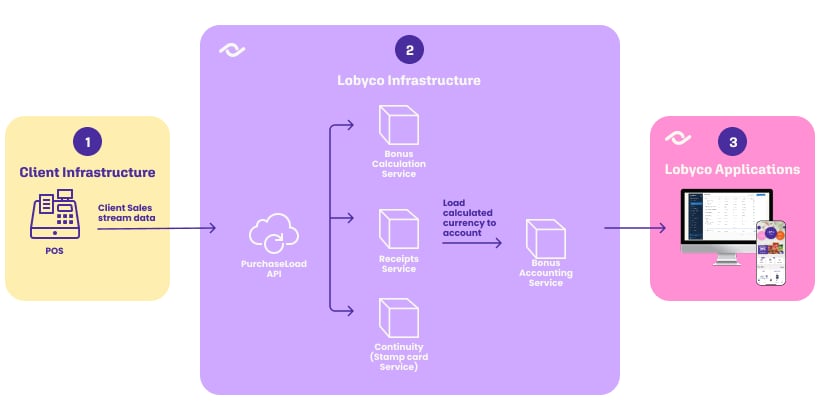
The API is built for fast ingestion, so the till is not left waiting. It validates the payload, stores it, and asynchronously publishes aPurchaseLoadedEvent to message broker topics that other services subscribe to — bonus calculation, digital receipts and the rest.
Purchases with and without a customer are published to separate topics. If you send a loyaltyCardId without a memberId, the service resolves the customer for you from the Loyalty Card service before publishing.
Integration options
Persist before you send. Write the transaction to local storage first, then transmit. A network blip or a service outage then costs you a retry rather than a lost sale.
Purchases with and without a customer
The presence ofmemberId in the payload decides how a purchase is treated.
Send everything, not just identified sales. Filtering anonymous purchases out is technically possible but costs you:
- Lobyco sees only revenue from identified customers, so the business context is incomplete
- Analytics degrade — some products, such as Self Checkout fraud detection, rely on whole-basket analysis
- Power BI reports comparing identified and anonymous behaviour become impossible
Validations
The payload is validated before anything is stored. These are the rules your integration has to satisfy.Required fields
Checkout type
The optionalcheckoutType records which channel the sale came through.
Products
Each product requiresid, sequenceNumber, name, categoryId, quantity, originalPrice and price.
priceis the amount after product-level discounts;originalPriceis before them- Returned or cancelled products carry a negative
price priceandoriginalPricemust share the same signcategoryIdmust not be empty or whitespace
Payment methods
At least one payment method is required unlesstotalAmount is zero. Each needs amount and a paymentType of Card, Cash, LoyaltyApp or Other.
- Card payments require
cardPan, the masked card number - Foreign currency requires both
currencyCodeandconversionRate(≥ 0) - If the currency matches the purchase currency,
conversionRatemust be1 roundingis only allowed onCash
Discounts
Discounts are optional, and each entry needs atotalDiscountAmount. There is no totalDiscount field on the purchase itself — the discounts array holds individual entries.
An entry is global when appliedProducts is missing, null or empty, and product-level when it lists product sequence numbers. The distinction changes how the amounts are validated.
One product can carry several discounts: the same sequenceNumber may appear in more than one entry, each with its own name and totalDiscountAmount. The product’s price must reflect the total after all of them, while originalPrice stays untouched — so a product at 10.00 with discounts of 0.50 and 4.83 ends up with a price of 4.67.
Keeping the discounts as separate entries is what lets each one be reported on individually.
A worked payload for this case is in the Purchases API reference.
Amount calculations
totalAmount has to reconcile three ways, and all three must agree.
taxNotIncluded is totalTaxAmount when any product has taxIncludedInPrice = false, and 0 otherwise.
The first two agreeing is what proves your discounts correctly bridge original prices and actual prices. A small deviation against the payment sum is tolerated.
Other rules
memberId,loyaltyCardId,externalDiscountCardId,posIdandphonemust not be empty or whitespace when provided- Tax
percentageis a fraction between 0 and 1 —0.25for 25% - Quantity
valuemust not be 0 - Shipping
totalAmountmust be greater than 0 - DisposalItem
unitPricemust be greater than 0