

Overview
Lobyco’s Bonus (or currency master) system provides comprehensive loyalty currency management, handling everything from balance tracking to complex earn/burn scenarios. This guide explains the standard setup and integration options for vendors working with the Currency Master system.Standard Bonus Setup
When Lobyco serves as the currency master, the platform provides a complete currency ledger solution with the following capabilities:Key Features
- Configurable Earn/Burn Rules: Set up flexible earning and burning rules by banner and/or partner
- Spend Optimization: Maximize customer spending through currency multipliers and promotional events
- Flexible Expiry Management: Configure customizable expiry parameters for currency balances
- Multi-Channel Redemption: Enable flexible redemption across all channels
- Product Controls: Define product/category inclusions and exclusions for currency calculations
- Advanced Timing: Implement tailored timing mechanisms for customer earn calculations (e.g., time of day restrictions)
- Third-Party Integration: Support for external earn integrations
Integration Options
Some existing loyalty programs may require bonus integration beyond the standard setup. There are two primary integration scenarios:Option 1: Posting to External Bonus System
In this scenario, Lobyco calculates bonus amounts and posts them to a client or third-party Bonus system.Requirements: A direct integration agreement between Lobyco and the external Bonus system must be established.
Option 2: External Posting to Lobyco
For vendors or clients who need to post currency calculations or accruals to customer balances in Lobyco’s system.API Integration
Bonus API Endpoint
External vendors and clients can integrate currency earnings using the Lobyco bonus API /load endpoint:Required Parameters
When integrating with this endpoint, ensure the following requirements are met:transactionType
The name of a pre-existing bonus type configured in Lobyco’s Bonus system. Example:"YearlyMemberDividends"
storeId
Must match the store IDs already defined in your store integration or manual import from your Retail Master Data integration.Important: Store ID consistency is crucial for proper integration functionality.
receiptId
Must follow the same logic used to define your globally unique receipt ID, as established in your Retail Master Data integration for Purchase Data.Important: Receipt ID consistency ensures proper transaction tracking and prevents duplicates.
System Architecture
The following diagram illustrates the Bonus flow and how integrations affect Lobyco services.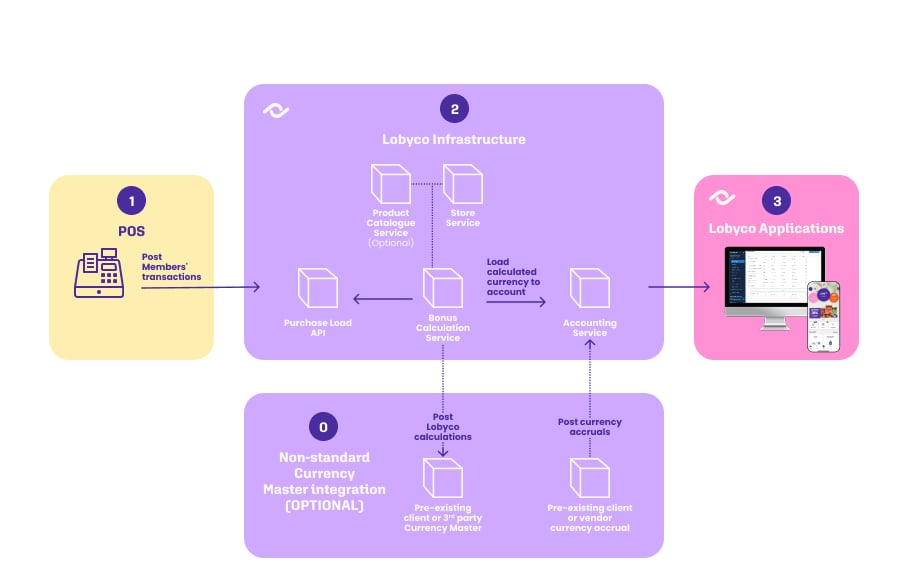
Next Steps
1
Review your existing loyalty program structure
2
Determine which integration option best fits your needs
3
Ensure your Retail Master Data integration is properly configured
4
Test the integration with sample transactions
5